
When an organization considers leaving VMware, live migration is almost always one of the first questions raised.
For a VMware team, the issue is not simply whether Proxmox VE has a live migration command.
The operational question is more important: will we still be able to evacuate a host, service hardware or carry out maintenance without interrupting applications?
In many environments, the answer is yes. Proxmox VE can move a running virtual machine between nodes in a cluster. But that capability does not automatically cover every scenario associated with VMware vMotion, Storage vMotion, DRS or Cross-vCenter vMotion.
The actual equivalence depends on what needs to move: the VM's execution state, its disks, its network connections or resources physically attached to the host.
In architecture, a feature should never be compared in isolation. It must be compared in its operating context.
The short answer
| Requirement | VMware | Proxmox VE |
|---|---|---|
| Host maintenance without shutting down the VM | vMotion | Live Migration |
| Migration with shared storage | Yes | Yes |
| Migration with local disks | Shared-nothing vMotion | Yes, with disk transfer |
| Migration between clusters | Cross-vCenter vMotion | Remote migration and PDM, subject to validation |
This functional equivalence does not guarantee the same production outcome. CPU compatibility, networking, storage and operating procedures determine what can actually be migrated without a perceptible interruption.
Why vMotion became essential to VMware operations
vMotion is not merely a way to move a VM from one server to another from time to time. It is part of the vSphere operating model.
Teams use it to:
- place an ESXi host into maintenance mode;
- patch a server or replace a hardware component;
- evacuate a host before an intervention;
- manually correct a load imbalance;
- execute recommendations or automated decisions from VMware Distributed Resource Scheduler, or DRS;
- move a VM to another cluster or environment when the architecture allows it.
The feature therefore contributes to workload mobility as a whole. During a VMware Exit, that broader capability must be compared—not just the presence of a Migrate action in the target interface.
What VMware means by vMotion
The term vMotion is often used for several different operations.
Compute migration with shared storage
In its classic form, vMotion moves a VM's execution between two ESXi hosts that access the same files on a shared datastore.
The disks are not copied. Memory, virtual CPU state and device state are transferred to the target host. The VM then continues using the same disks from its new server.
Storage vMotion
Storage vMotion moves a VM's files and disks between datastores. Compute can remain on the same host.
This mechanism addresses different needs: storage array replacement, capacity rebalancing, storage policy changes or datastore retirement.
Compute and storage migration
VMware can also move compute and storage at the same time. This scenario is commonly called shared-nothing vMotion.
It is required when the destination cannot access the source datastore. The migration must then transport both the execution state and the VM's persistent data.
Across clusters and vCenter instances
A migration can stay within one cluster, move to another cluster or cross separate vCenter instances. Requirements increase with scope: version compatibility, permissions, connectivity, storage, VM networking, virtual switches and licensing.
Talking about “replacing vMotion” without specifying which of these scenarios is being assessed leads to an incomplete comparison.
Migration terminology in Proxmox VE
For an active QEMU/KVM VM, Proxmox VE uses the terms online migration and live migration. In this context, both describe moving a running VM.
A stopped VM undergoes an offline migration. That operation should not be presented as live migration, even though it is simpler and supports a wider range of configurations.
It is also necessary to distinguish between:
- migration between nodes in the same Proxmox VE cluster;
- moving volumes between storage systems;
- migrating a VM that has local disks;
- remote migration between independent clusters;
- the behavior of QEMU/KVM VMs and that of LXC containers.
The specific case of LXC containers
The Proxmox VE 9.2.4 guide states that a running LXC container does not support a truly live migration. Proxmox provides a restart migration: the container is stopped, moved and restarted on the target node.
The interruption may be short, but the mechanism is not the exact equivalent of live migration for a QEMU/KVM VM. The rest of this article primarily concerns those VMs.
How live migration works
Live migration is not simply a copy of RAM.
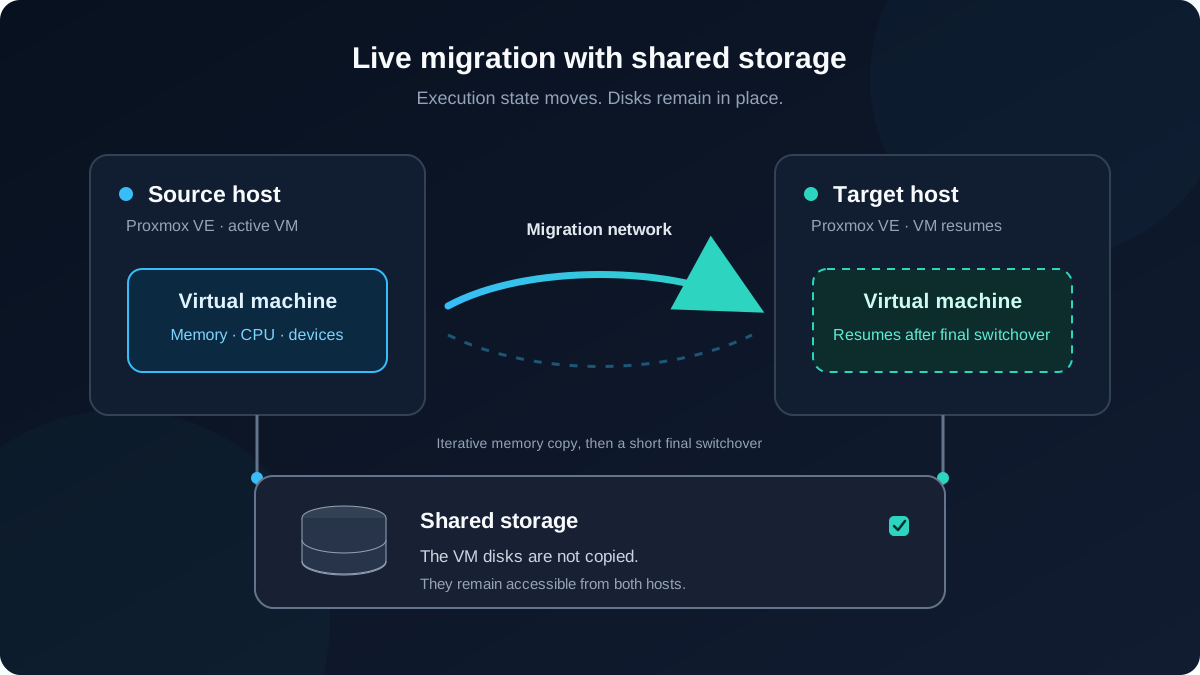
Proxmox VE first prepares a QEMU process on the target node. Its virtual CPUs remain paused while the source starts transmitting the required state.
Memory is copied in iterations. During the transfer, the VM keeps running and modifies some memory pages. Those pages are marked as dirty and sent again during a later pass.
When the remaining volume becomes sufficiently small, the source VM is briefly suspended. The final pages and device state are transferred, then the VM resumes on the destination.
There is therefore a final phase during which execution is interrupted. Its duration cannot be promised in advance: it depends on used memory, the dirty-page rate, available throughput and the system's ability to converge.
Case 1: the VM uses shared storage
Shared storage is the scenario closest to classic vMotion.
Both nodes already access the VM's disks. During migration, Proxmox VE mainly transfers memory and device state. The volumes remain on the existing storage system.
This architecture may use:
- a Ceph cluster;
- an NFS share;
- correctly presented iSCSI or Fibre Channel storage;
- another backend that Proxmox VE identifies as shared and that both nodes can use.
The word SAN is not a guarantee, however. Storage, volumes and identifiers must be consistently accessible from both the source and destination.
The bridges or networks used by the VM must also exist on the target node. A migration that completes technically is not a success if the VM resumes on the wrong or an unreachable network.
Case 2: the VM has local disks
Proxmox VE can live-migrate a compatible VM while sending its local disks to the destination.
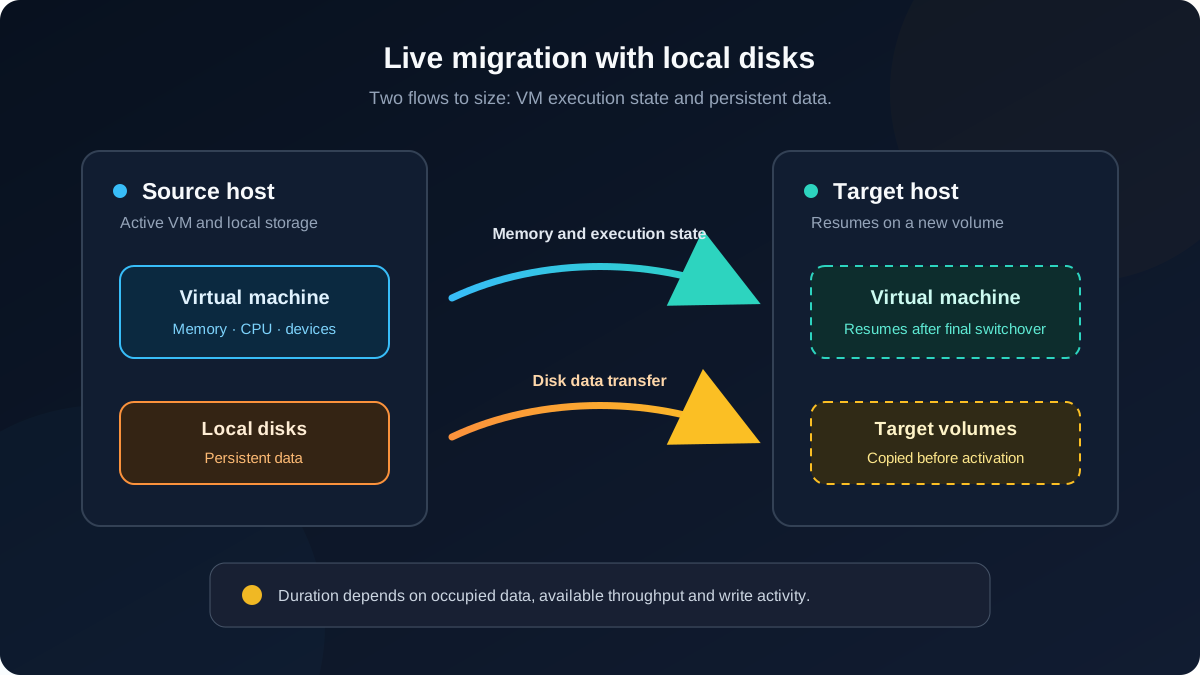
This changes the operation significantly: it no longer transports only execution state. Persistent data must also be copied to storage available on the target node.
Duration then depends on several factors:
- the amount of data actually occupied by the volumes;
- source and destination storage performance;
- available bandwidth;
- the configured migration bandwidth limit;
- the VM's write activity;
- competition from backups, replication or storage rebuilds.
A VM containing several terabytes of data therefore has a very different profile from a small VM running on shared storage.
CPU compatibility: the often underestimated requirement
A running VM retains the state of the virtual CPU presented when it started. The target node must be able to resume that state.
The host CPU type closely exposes the physical processor's capabilities. It can make more instructions available, but reduces mobility when nodes use different models, generations or microcode levels.
Generic CPU models and the x86-64-v* families provide a more consistent baseline. The usual objective is to expose the features required by the application without exceeding those available on the least capable node within the migration scope.
The Proxmox VE guide requires processors from the same vendor with similar capabilities for a supported scenario. Migration between Intel and AMD can work in some configurations, but it is not guaranteed and should not become a production assumption without testing.
VMware has historically addressed this issue with Enhanced vMotion Compatibility, or EVC, which masks some CPU features to present a common level across hosts. Proxmox VE uses a different approach based on the CPU model configured for each VM.
The migration network
By default, Proxmox VE can use the cluster network for migration traffic. The documentation recommends preventing large transfers from disrupting latency-sensitive cluster communications.
A dedicated migration network separates the flows and can use a better-sized interface. Its design must cover:
- effective throughput between every pair of nodes;
- latency and stability;
- MTU consistency across the entire path;
- competition between concurrent migrations;
- storage traffic when disks must also be copied;
- monitoring of errors, retransmissions and saturation.
Proxmox VE offers secure and insecure migration modes. VM memory can contain sensitive information. Insecure mode should therefore only be considered on a private, isolated and controlled network. Storage content is currently still transferred over a secure channel.
The same caution applies on VMware: vMotion flows require predictable and protected connectivity. Exact sizing cannot simply be carried over from one platform to another because network and storage architectures may change during a VMware Exit.
Configurations that can block migration
Live migration requires the destination to recreate the VM's environment.
Limitations confirmed by the current Proxmox VE guide include:
- a PCI device passed directly to the VM;
- a GPU assigned through PCI passthrough;
- a directly attached USB device;
- another resource physically tied to the source server;
- storage that is absent or inaccessible on the destination;
- a bridge or network that cannot be reproduced;
- a CPU model that the target node cannot provide;
- a destination running older, incompatible package versions.
An ISO image or local volume must remain accessible or be transferred. A snapshot is not described here as a systematic blocker: behavior depends on the storage backend, format and requested operation.
When a VM uses a non-migratable local device, an offline migration may remain possible after adapting the configuration on the destination. That solution requires a planned interruption.
Planned migration, HA and CRS serve different purposes
During planned maintenance, the source host is still running. It can transmit the VM's memory and state to another node.
After a sudden failure, that state has already been lost. High availability can restart the VM on another server, but it cannot live-migrate memory that is no longer accessible.
In Proxmox VE:
- a manual migration moves a resource that is still active;
- maintenance mode can request evacuation of a node's HA services;
- HA restarts a resource after a failure and correct fencing;
- the Cluster Resource Scheduler, or CRS, selects placement and can rebalance some HA resources;
- CRS uses migration when possible, but does not make a VM migratable when its requirements are not met.
CRS behavior, rules and differences from VMware DRS are covered in Proxmox CRS: the new DRS for automatic cluster balancing?.
Migration between clusters and Proxmox Datacenter Manager
Within a Proxmox VE cluster, migration between nodes remains the most established native scenario.
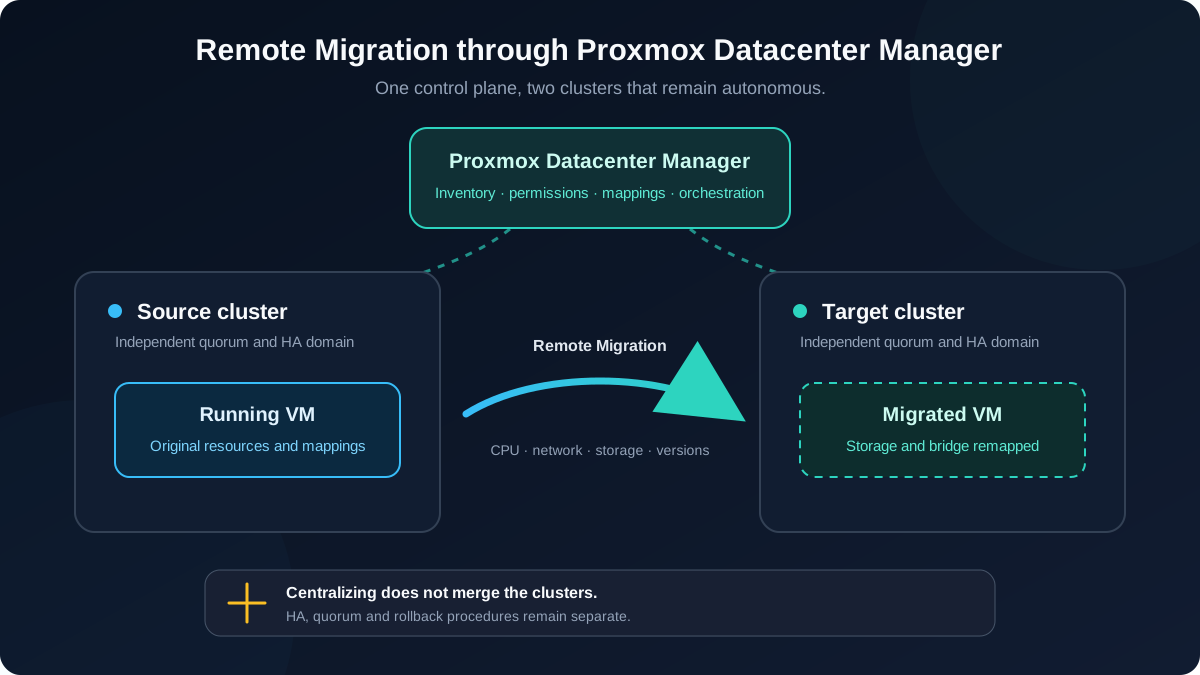
Remote migration can also move a VM to an independent cluster. This operation requires mapping source storage and bridges to their counterparts on the destination. It may also change the VM identifier.
Proxmox Datacenter Manager provides a centralized control plane for resources across multiple clusters and exposes migrations between remotes. Its current documentation describes live VM migration between clusters.
This capability still requires caution. In the Proxmox VE 9.2.4 guide, the underlying qm remote-migrate command remains classified as experimental. PVE and PDM versions, network mapping, storage, CPU compatibility and rollback must be validated together.
Two clusters connected to Proxmox Datacenter Manager do not become a single cluster. They do not share the same quorum, HA domain or CRS.
Detailed comparison
| Requirement | VMware vSphere | Proxmox VE | What to validate |
|---|---|---|---|
| Live migration within a cluster | vMotion | QEMU/KVM online or live migration | CPU, networking and local resources |
| Compute with shared storage | Established integrated capability | Supported within the cluster | Identical access to storage and bridges |
| Compute and local disks | Shared-nothing vMotion | Migration with local disk transfer | Duration, throughput and storage load |
| Storage-only movement | Storage vMotion | Move Storage or disk movement | Backend, format, snapshots and performance |
| CPU compatibility | EVC and vCenter controls | QEMU CPU models and custom models | Lowest common denominator across the cluster |
| Automation | DRS with several automation levels | CRS for HA-managed resources | Scope, rules and maturity |
| Sudden host failure | HA restart, not vMotion of lost memory | HA restart after fencing | Quorum, watchdog, capacity and storage |
| Migration between clusters | vMotion or Cross-vCenter depending on design | Remote migration, notably through PDM | Versions, mappings and evolving maturity |
| Running container | Not directly comparable | LXC restart migration | Application interruption to measure |
Advantages VMware still retains
VMware retains deep integration built over many years between vCenter, vMotion, EVC, DRS, Distributed Switches and the wider operations ecosystem.
That maturity is visible in:
- detailed presentation of DRS recommendations;
- automation and control levels familiar to operations teams;
- documented Cross-vCenter scenarios;
- maintenance procedures that are often already industrialized;
- an ecosystem of integrations able to observe and control migrations.
An organization that genuinely uses these capabilities must include the cost of rebuilding them in its Proxmox architecture. Ignoring them because a manual migration works would be a scoping error.
What Proxmox VE brings
VM migration is a native Proxmox VE capability. It is managed from the same interface as clusters, storage and HA, without a separate migration license.
In a homogeneous cluster with shared storage and consistent networking, the operating model is direct and understandable. The ability to transfer local disks also provides useful flexibility for architectures without centralized storage.
Proxmox VE exposes migration commands, task logs and settings clearly. This transparency makes troubleshooting easier, but it does not remove the need to build the monitoring, procedures and safeguards expected in production.
Checklist before considering vMotion replaced
CPU
- Inventory CPU vendors, models, generations and microcode levels.
- Identify VMs configured with the
hostCPU type. - Define the smallest acceptable common CPU model.
- Test migrations in both directions between every authorized node pair.
Storage
- Identify shared and local volumes.
- Verify actual accessibility from each destination.
- Measure performance during a local disk transfer.
- Check bandwidth limits and available capacity.
Network
- Define an appropriately sized migration network.
- Check throughput, latency, MTU and redundancy.
- Verify bridges and VLANs on every node.
- Observe the effect on Corosync, storage and application traffic.
VM configuration
- Inventory PCI, GPU and USB passthrough.
- Identify ISOs, volumes or resources tied to a single host.
- Measure used memory and its dirty-page rate.
- Document application and network dependencies.
Operations
- Define application-level success criteria.
- Monitor migrations and their errors.
- Test maintenance mode and HA separately.
- Document cancellation and return to the original node.
- Define what to do when a migration does not converge.
A validation method for the POC
The POC must reproduce difficult scenarios, not merely move an idle VM.
A useful protocol can follow this sequence:
- migrate a stopped VM to validate basic mappings;
- migrate a lightly loaded active VM on shared storage;
- repeat the operation under sustained CPU load;
- use a VM consuming a large amount of memory;
- generate a high dirty-page rate;
- measure a migration involving sustained disk writes;
- migrate a VM with local disks;
- test multiple destinations and CPU generations;
- simulate a loss of connectivity in an isolated environment;
- observe interruption from the application, not only from the hypervisor;
- measure duration, generated traffic and storage load;
- execute the planned rollback.
Results should be retained by workload profile. A global average hides VMs that cannot meet the same maintenance window as the rest.
To structure this validation, see what a Proxmox POC must actually validate and our Proxmox POC page.
Does Proxmox replace vMotion?
Yes, for many common maintenance and live migration scenarios.
A properly designed Proxmox VE architecture can migrate running VMs, evacuate a host for maintenance and move workloads using shared storage or, under the right conditions, local disks.
But that answer cannot be generalized to every VMware use case.
Environments deeply integrated with vCenter, DRS, EVC, Cross-vCenter migrations or physical devices require more detailed qualification. Operational maturity, visibility and existing automation matter as much as the technical ability to move a VM.
The right conclusion is not “Proxmox has vMotion.” It is more precise: Proxmox VE covers a large proportion of the requirements associated with vMotion, provided that the target architecture and operating procedures have been designed to preserve that mobility.
A successful migration does not depend only on the presence of a Live Migration feature. It depends primarily on the architecture, operating procedures and validation completed before cutover.
VSHIFT supports this validation through an assessment of the existing environment and target architecture, a Proxmox POC or a VMware Exit roadmap. Our case studies show the other areas that must be qualified before cutover.
Official sources
- Proxmox VE Administration Guide 9.2.4
- Proxmox Datacenter Manager 1.1.7 — Introduction
- Proxmox Datacenter Manager — Remotes
- Proxmox Datacenter Manager — Command Syntax
- Broadcom — vMotion with shared storage or shared-nothing
- Broadcom — VMware EVC and CPU compatibility
- Broadcom — vMotion network requirements
- Broadcom — Cross-vCenter Migration