
Initial VM placement is never permanent. Workloads evolve, some machines consume more than expected, and maintenance gradually moves services around. A cluster that was balanced on Monday may concentrate most of its memory or CPU demand on one node a few weeks later.
VMware has long addressed this problem with Distributed Resource Scheduler, better known as DRS. Proxmox VE has its own mechanism: the Cluster Resource Scheduler, or CRS. With Proxmox VE 9.2 and its new Dynamic Load Balancer, the comparison has finally become meaningful.
CRS is not a DRS copy, however. Its scope, triggers and maturity are different. Operating it correctly requires a clear understanding of what it measures, when it makes decisions and which resources it can actually move.
In architecture, a feature should never be compared in isolation. It must be compared in its operating context.
What is the Cluster Resource Scheduler?
CRS is the placement engine used by the Proxmox VE high-availability manager. It helps the HA Manager select the best node whenever an HA-managed VM or container needs to start, recover or move.
The scheduler may become involved during:
- service recovery after a node failure;
- an HA-controlled start or relocation;
- a change to HA rules or groups;
- start-time rebalancing, when enabled;
- periodic automatic rebalancing with Proxmox VE 9.2.
The defining point is that CRS belongs to the HA stack. It does not indiscriminately inspect every VM in the datacenter. The Proxmox VE 9.2 automatic mechanism migrates resources managed by HA Manager and allowed to participate in rebalancing.
From Proxmox VE 7.3 to 9.2: three stages of evolution
CRS did not suddenly appear in version 9.2.
Proxmox VE 7.3: the foundation
In 2022, Proxmox VE 7.3 established the foundations of the Cluster Resource Scheduler as a technology preview. The static-load mode went beyond counting services and used configured vCPU and memory values to evaluate possible destinations.
The engine uses TOPSIS, a multi-criteria decision-making method. Each eligible node is an alternative; the scheduler compares the effect of placement across the cluster and selects the most favorable option.
This initial CRS remained limited to situations where HA Manager already needed to find a new node: recovery after a failure, shutdown policy handling or HA-group configuration changes. It did not yet monitor load to initiate migrations proactively and therefore did not provide continuous balancing.
Proxmox VE 9.0: more precise placement rules
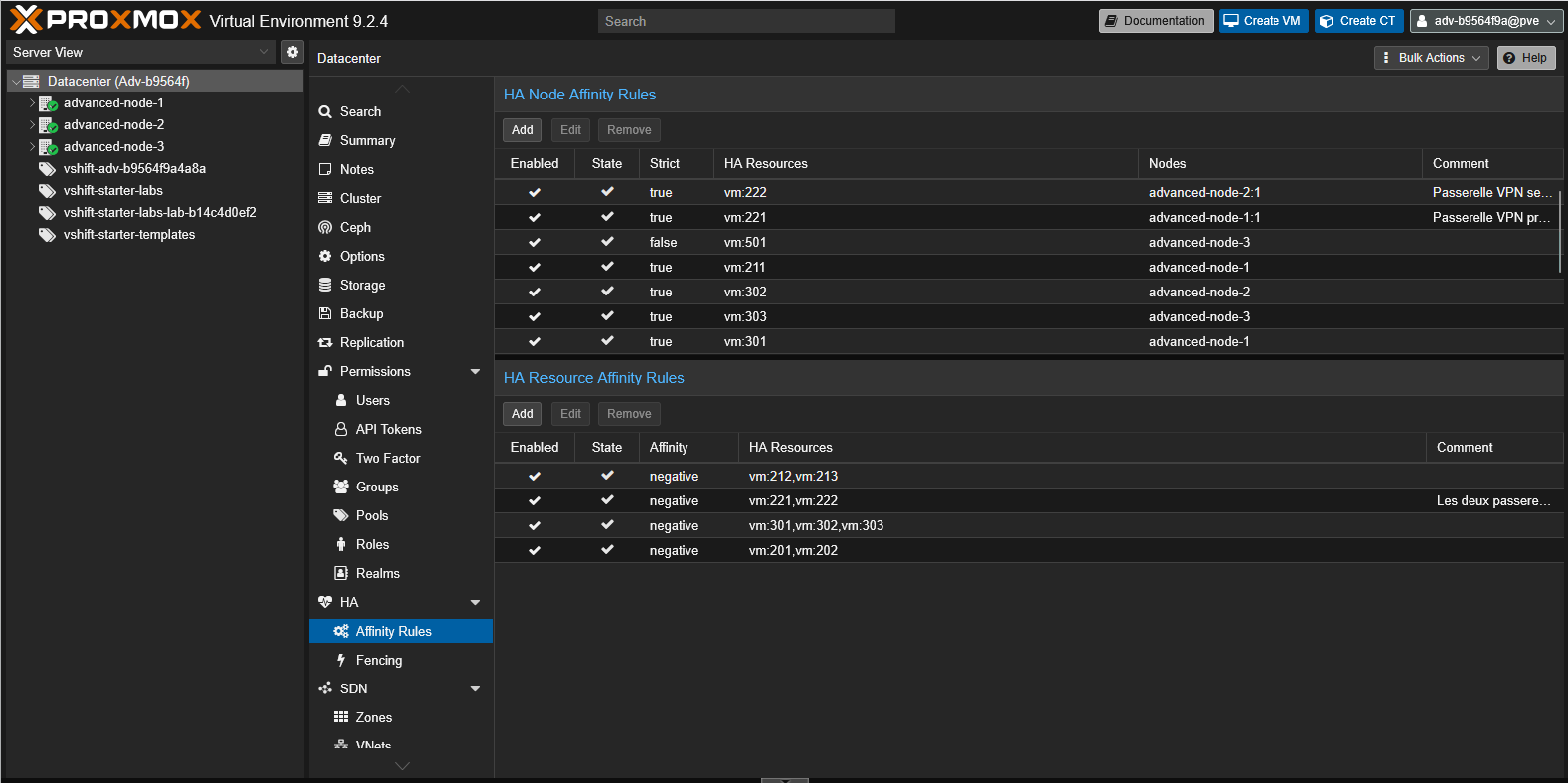
Proxmox VE 9.0 turned placement constraints into explicit HA rules. Legacy HA-group configurations were deprecated and migrated to affinity rules between resources and nodes.
A resource-to-node rule can assign priorities to several hosts. In non-strict mode, CRS prefers those nodes but may use another cluster member when they are unavailable. In strict mode, the resource may run only on the permitted nodes; if none is available, HA does not start it elsewhere.
Resource-to-resource rules describe relationships between workloads. Positive affinity asks CRS to keep them on the same node, for example to reduce latency between an application and its database. Negative affinity spreads them across different nodes so that one failure does not affect several redundant components at once.
These rules apply to placement, HA recovery and migrations selected by CRS. Creating or changing a rule may trigger movement to restore its constraint. Proxmox VE 9.0 still did not initiate migrations by observing load imbalance; it supplied the placement framework that the 9.2 dynamic mode would later use.
Proxmox VE 9.2: actual load and automatic migrations
Since May 2026, dynamic-load has added actual CPU and memory utilization to placement decisions. The CRS Load Balancer can also initiate HA resource migrations automatically when doing so reduces a persistent imbalance between nodes.
This is where CRS comes closest to VMware DRS. The scheduler no longer selects a destination only when another event already requires placement; it can act proactively to improve workload distribution.
The three calculation modes
Scheduler mode fundamentally changes placement quality.
basic: count active resources
The historical mode primarily distributes the number of HA services. Three tiny VMs and three heavily loaded VMs have the same numerical weight.
This is predictable and inexpensive, but it can create a misleading visual balance: every node hosts the same number of VMs while their actual demand is completely different.
static-load: use configured resources
The scheduler considers the vCPU and memory assigned in guest configurations. Before placing a resource, it simulates its effect on every eligible node.
This works well when allocations reflect real requirements. It becomes less precise with heavily oversized VMs or workloads whose utilization varies substantially over time.
dynamic-load: incorporate observed utilization
Dynamic mode combines node and guest utilization metrics with configured allocations. It can therefore distinguish a genuinely busy machine from one with eight assigned vCPUs that remains almost idle.
Memory is weighted particularly heavily because it is physically limited and less compressible than CPU. The scheduler is not seeking perfect equality; it looks for a better alternative while considering both peak node utilization and overall distribution.
| Mode | Primary input | Advantage | Limitation |
|---|---|---|---|
basic |
Number of HA services | Simple and predictable | Ignores size and load |
static-load |
Configured vCPU and RAM | Anticipates declared demand | Sensitive to over-allocation |
dynamic-load |
Actual load and allocations | Better reflects activity | Relies on reliable, variable metrics |
How does automatic rebalancing work?
HA Manager operates in rounds of roughly ten seconds. During each round, the load balancer can assess cluster imbalance. It does not migrate a guest after every small fluctuation: several safeguards prevent continuous movement.
The process can be summarized as follows:
- measure node and HA-resource load;
- check whether imbalance exceeds the configured threshold;
- wait until it persists for the required duration;
- simulate eligible migrations;
- reject moves that break HA rules or provide insufficient improvement;
- select the migration that reduces imbalance most effectively;
- execute migrations sequentially and reassess the cluster.
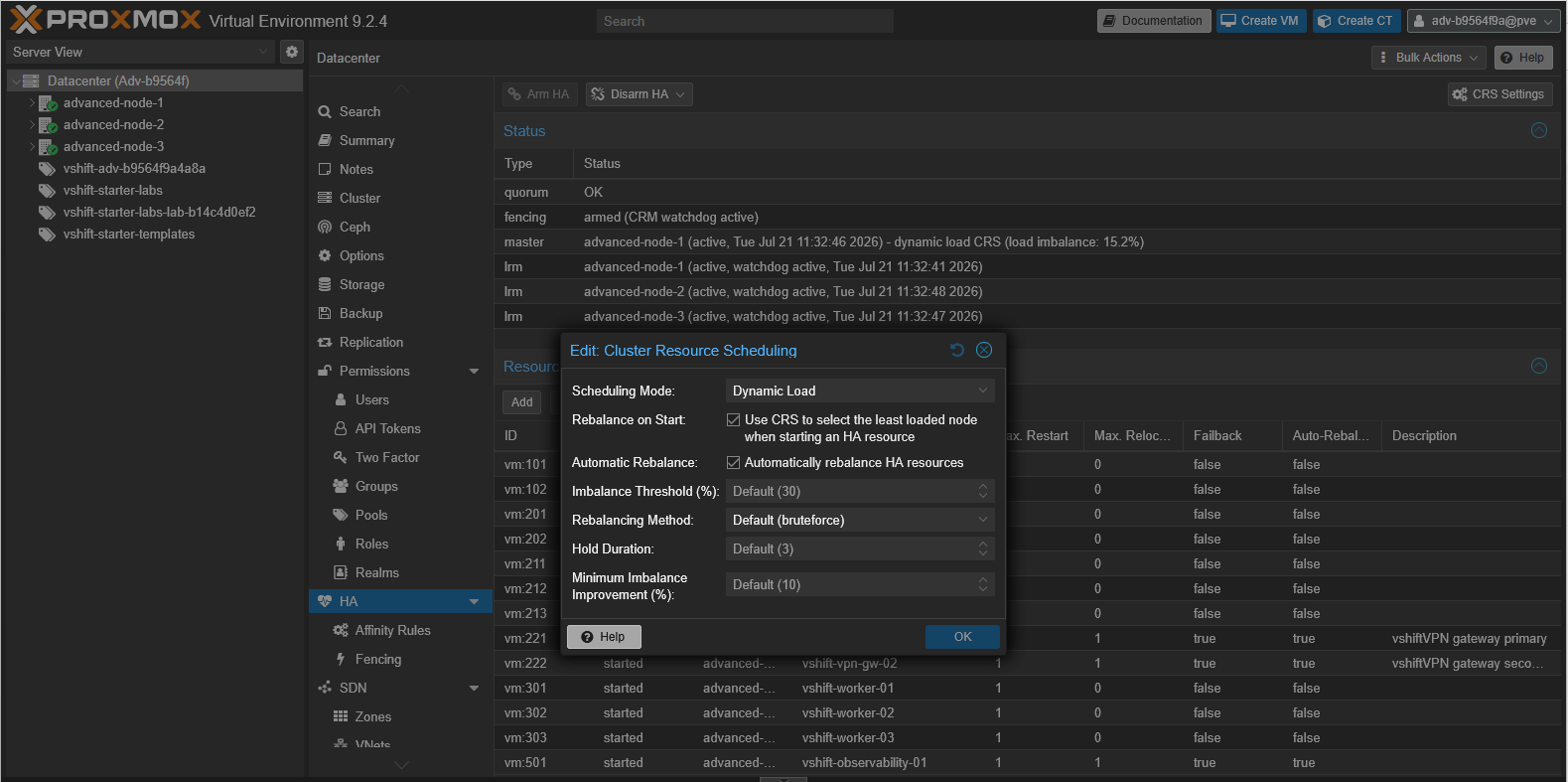
Dynamic Load, start-time rebalancing and automatic migrations are configured from the datacenter CRS settings.Understanding the rebalancing settings
Imbalance Threshold (%). This threshold defines when the cluster is sufficiently imbalanced for a migration to be considered. Imbalance is normalized to a 0–100% range from the mean and standard deviation of node loads. The default is 30%. CRS takes no action while the cluster remains below it.
Rebalancing Method. This option selects how migration candidates are scored. bruteforce, the default, compares eligible moves and selects the one with the lowest expected imbalance. TOPSIS is the other method available in Proxmox VE 9.2; it ranks candidates relative to an ideal and an unfavorable solution. HA rules remain authoritative with either method: a forbidden destination never becomes a candidate.
Hold Duration. This is the number of consecutive HA rounds for which imbalance must remain above the threshold. Each round lasts roughly ten seconds. With the default value of 3, imbalance must therefore persist for approximately thirty seconds before CRS searches for a migration. The counter resets when load falls back below the threshold.
Minimum Imbalance Improvement (%). A migration is issued only when it reduces imbalance by at least this relative percentage. The default is 10%. For example, with current imbalance at 40%, a simulated move that lowers it to 37% improves the situation by only 7.5% and is rejected. A move that lowers it to 35% provides a 12.5% improvement and may be selected.
Together these settings form a decision chain: exceed the threshold, remain above it for the hold duration, find the best permitted move, then verify that its gain clears the minimum improvement. This double filter prevents a temporary spike or marginal benefit from triggering an expensive migration.
Why are migrations sequential?
CRS runs balancing migrations one at a time. This limits simultaneous pressure on networking, storage and compute nodes, although it means that returning to balance is gradual.
After every migration, reality may differ from the simulation: application load has changed, memory demand has moved or another HA action has occurred. Reassessing between moves is safer than executing a parallel plan that may already be obsolete.
In a severely unbalanced cluster, operators must accept that convergence takes time. CRS prioritizes operational stability over the speed of a large-scale redistribution.
HA rules remain authoritative
The load balancer can only select destinations allowed by HA rules.
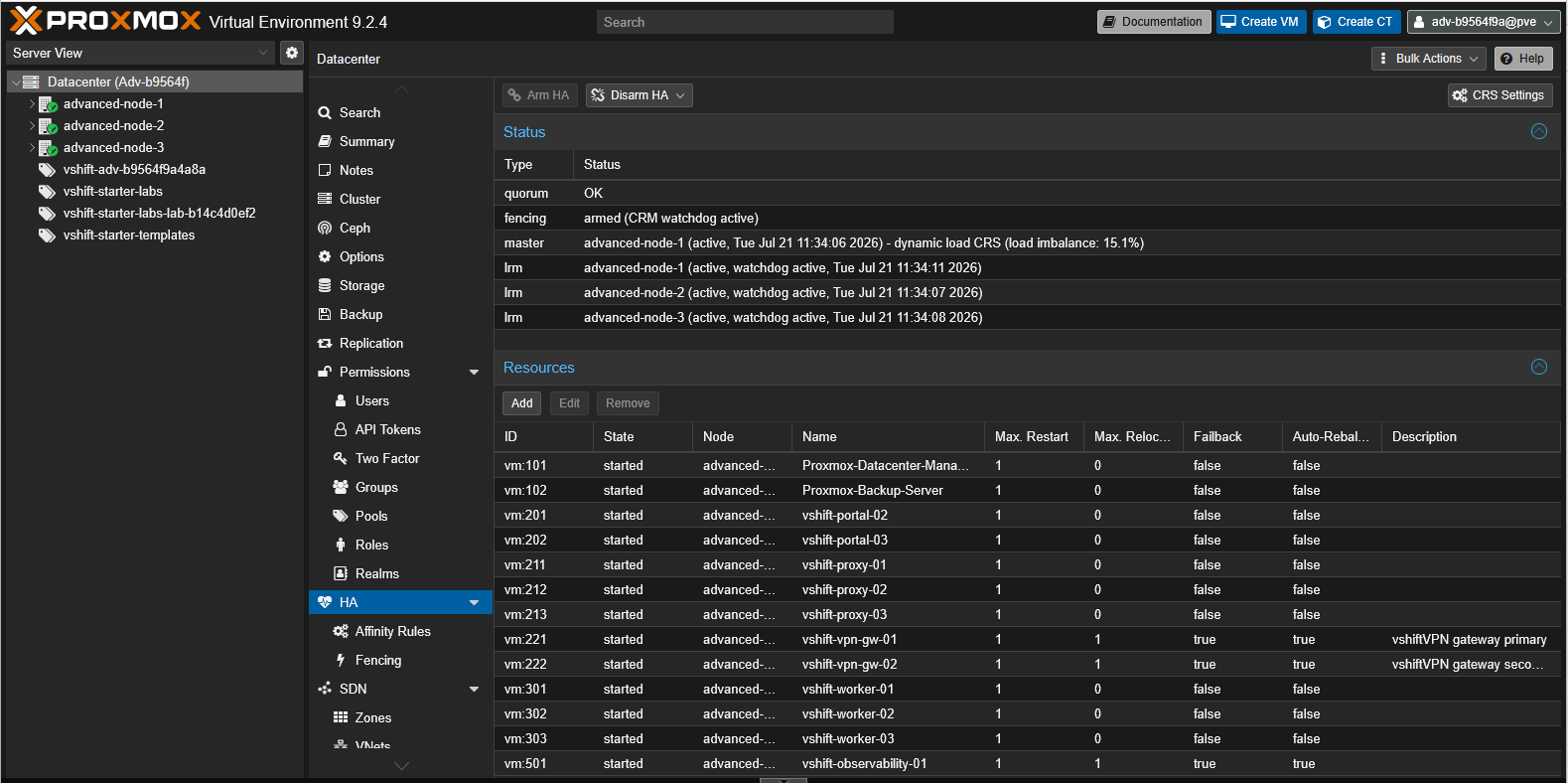
Auto-Rebalance setting controls whether each resource may participate in automatic migrations.Node affinity
An affinity rule can prefer selected nodes or exclude others. A VM requiring an accelerator, specialized network or compatible CPU generation must remain on hosts that satisfy those constraints.
Positive resource affinity
Resources can be kept together. This is useful when proximity reduces critical latency, but the resulting group is harder to move and can concentrate demand.
Negative resource affinity
Redundant components can be separated so that a node failure does not affect them simultaneously: controllers, replicated databases, front ends or members of the same service.
Rebalancing exclusion
The auto-rebalance option can be disabled for an HA resource. It remains managed by HA, but the load balancer no longer selects it for automatic migrations. A resource with positive affinity to an excluded resource is also excluded from rebalancing.
This is valuable for a VM sensitive to micro-outages, an appliance with hardware-bound licensing, or a workload whose migration consumes substantial bandwidth.
Start-time versus continuous rebalancing
Two related mechanisms should not be confused.
The ha-rebalance-on-start option allows the scheduler to consider placement more broadly when an HA resource starts. It improves distribution during a start event, but does not provide continuous balancing by itself.
The Proxmox VE 9.2 CRS Load Balancer monitors imbalance over time and may initiate a migration even when no resource is starting.
The documentation still recommends caution with ha-rebalance-on-start in static-load and dynamic-load modes, especially in environments with thousands of HA resources, because the number of combinations grows quickly.
CRS compared with VMware DRS
The comparison is useful as long as architectural and maturity differences remain visible.
| Capability | Proxmox CRS with PVE 9.2 | VMware DRS |
|---|---|---|
| Initial placement | Yes, for HA resources | Yes |
| Actual CPU and memory load | Yes, with dynamic-load |
Yes |
| Automatic migrations | Yes, for eligible HA resources | Yes, based on automation level |
| Affinity and anti-affinity rules | Yes, through HA rules | Yes |
| Recommendations without execution | More limited visibility | Mature manual mode and recommendations |
| Scope | HA Manager within one PVE cluster | vSphere cluster managed by vCenter |
| Automation tuning | Thresholds and per-resource exclusions | Several automation levels |
| Maturity and ecosystem depth | Recent capability | Long-established capability |
| Licensing | Included in open-source Proxmox VE | Depends on VMware edition and licensing |
DRS has years of optimization, detailed recommendation presentation and deep integration with the vSphere ecosystem. CRS is newer and deliberately centered on Proxmox HA.
For a VMware exit strategy, the useful question is not “does CRS have every DRS control?” but “does it cover the placement, balancing and operational policies our cluster actually requires?”
CRS cannot create physical capacity
A scheduler distributes load; it does not create CPU, RAM or IOPS.
When every node is approaching saturation, moving a VM solves nothing. The migration may even increase network and storage demand temporarily. Enough reserve must remain to absorb the loss of a node and restart its HA resources.
Capacity must therefore be tested against degraded scenarios, not just nominal operation:
- utilization after losing the largest node;
- memory available without unsafe overcommitment;
- migration-network throughput;
- shared-storage latency and capacity;
- time required to evacuate or maintain a host;
- impact of backups, replication and Ceph operations.
Prerequisites before enabling it
HA must genuinely work
Quorum, watchdog, fencing, groups and restart policies must already have been tested. Enabling an automatic scheduler on top of poorly understood HA increases the number of possible actions without fixing the foundation.
CPU compatibility must be controlled
Live migration requires compatible CPU models across nodes. Mixed generations, flags exposed with host, and some appliances require specific validation.
The migration network must be sized correctly
A memory-intensive VM may resend modified pages several times before final switchover. A saturated network extends migration time and can increase residual downtime.
Storage must be accessible at the destination
With shared storage, the disks remain available and migration primarily moves memory state. With local disks, transfer is heavier and is not equivalent to a simple compute relocation.
Metrics must be consistent
Dynamic mode makes decisions from available measurements. NTP, monitoring and collection must be reliable. Results should be compared with application and storage metrics because CRS cannot interpret the business criticality of a transaction.
What CRS cannot infer
CRS does not know:
- the business window during which a micro-outage is unacceptable;
- an application's dependency on an external appliance;
- that a batch job is about to finish;
- the real priority of a customer or service;
- that a datastore will soon saturate;
- whether a license remains compliant after relocation;
- the organizational cost of an automatic migration.
These facts must be translated into HA rules, exclusions, operating windows, alerts or procedures. Scheduler intelligence depends directly on the quality of the model provided by administrators.
An eight-step rollout method
- Upgrade a test cluster to Proxmox VE 9.2 and verify HA health.
- Inventory eligible resources and their CPU, network and storage dependencies.
- Formalize affinities, anti-affinities and allowed nodes.
- Start with
static-loadand observe scheduler choices. - Enable
dynamic-loadfor a non-critical scope. - Use
auto-rebalanceto exclude workloads that must not migrate automatically. - Configure conservative thresholds and observe a complete workload cycle.
- Test node loss, maintenance, convergence and rollback.
Useful indicators include migration count and duration, balance improvement, CPU and memory before and after, network consumption, storage latency and observed application interruptions.
CRS and Proxmox Datacenter Manager have different roles
CRS acts inside a Proxmox VE cluster. It selects a node and balances that cluster's HA resources.
Proxmox Datacenter Manager provides visibility and operations across multiple independent clusters. PDM may facilitate a cross-cluster migration, but it does not turn several clusters into one CRS domain.
The architecture can be summarized as follows:
- CRS decides where a resource runs within its cluster;
- HA Manager maintains its desired state and orchestrates local actions;
- PDM centralizes visibility and selected operations across environments.
Should CRS be enabled in production now?
Yes, when the organization already has a healthy HA cluster, a coherent architecture and a genuine test method. Dynamic mode and the load balancer address an important gap for high-density Proxmox VE environments.
No, when the objective is to hide saturation, untested HA or an undersized migration network. Automation accelerates sound decisions as well as bad configurations.
The best starting point is not global activation. It is a scope of non-critical VMs, conservative thresholds and observation across several workload cycles.
Perspective
The Proxmox VE 9.2 Dynamic Load Balancer is a major evolution. With actual utilization, affinity rules, exclusions and automatic migrations, CRS now goes far beyond selecting a restart destination.
It is not yet a functional clone of VMware DRS, nor does it need to be. CRS fits a Proxmox architecture where HA remains the decision framework and administrators retain explicit control over automated resources.
For organizations assessing a VMware exit, CRS nevertheless closes a meaningful part of the operational gap. Dynamic placement can no longer be dismissed with “Proxmox has no DRS.” There is now a native, credible and testable answer — provided it is treated as critical infrastructure rather than a checkbox.