
For years, administering several Proxmox VE environments meant opening as many interfaces as there were clusters.
That model remains manageable with one primary cluster and a single operations team. It becomes far less comfortable when infrastructure spans several sites, independent clusters and Proxmox Backup Server instances.
Administrators then need global answers: where is a particular VM, which cluster is short on capacity, which nodes have pending updates, where are backups stored, and can a workload move to another site?
Proxmox Datacenter Manager, or PDM, provides this missing management layer. Its first stable release arrived in December 2025. Version 1.1, released in May 2026, added automated installation workflows, centralized subscription management and deeper Ceph visibility.
What is Proxmox Datacenter Manager?
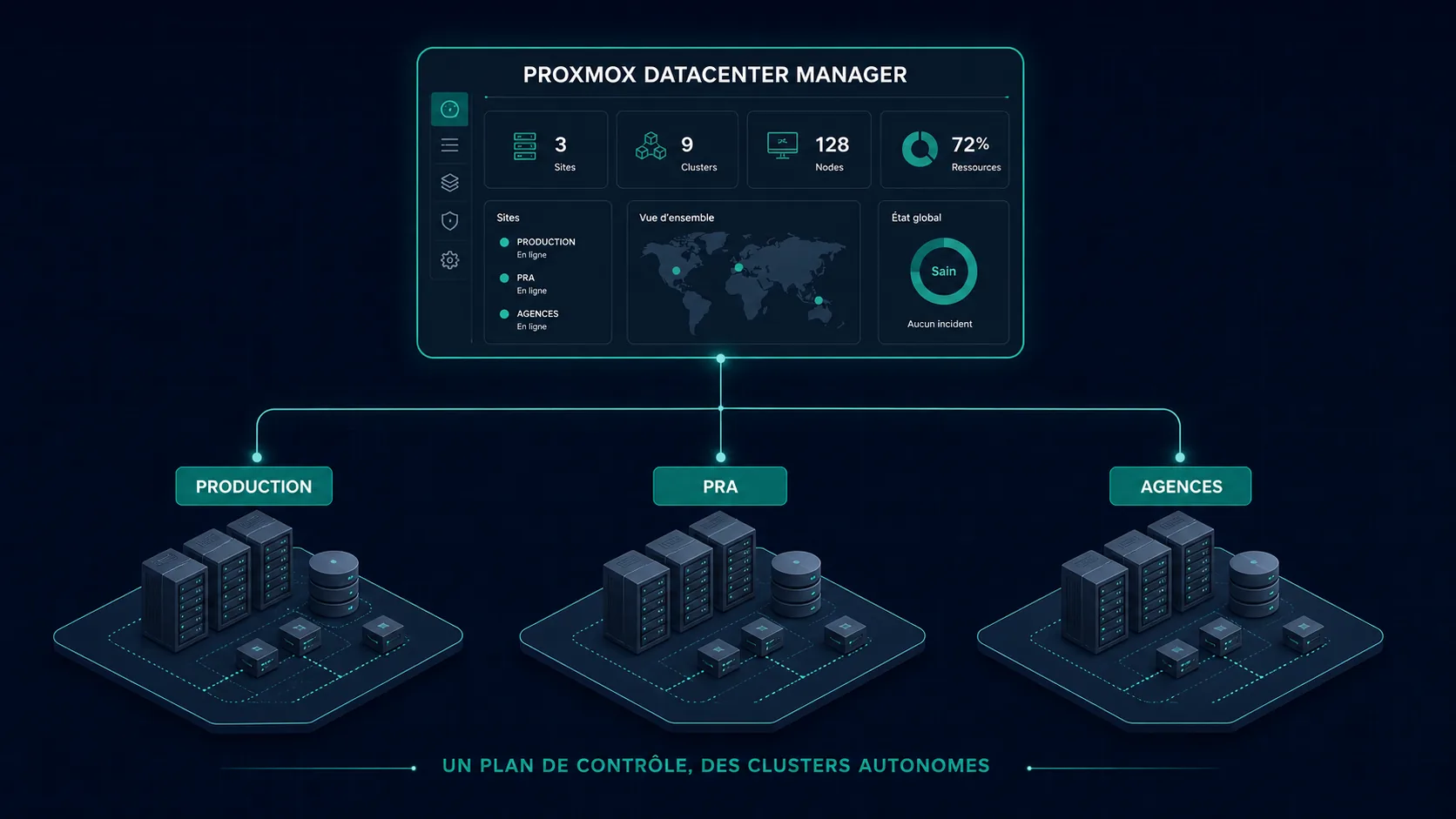
PDM is a centralized control plane for Proxmox infrastructure. It connects independent environments known as remotes:
- Proxmox VE clusters;
- standalone Proxmox VE nodes;
- Proxmox Backup Server instances;
- platforms distributed across sites or regions.
It aggregates inventory, metrics and tasks into one interface, exposing nodes, VMs, containers, storage and backup datastores without requiring operators to browse each system separately.
PDM can also perform common operations: guest lifecycle actions, snapshot management, task tracking, update monitoring, remote shell access on compatible versions, cross-cluster migration, Ceph monitoring and selected SDN/EVPN tasks.
Detailed configuration still links back to the native PVE or PBS interface. PDM is a global control plane, not a complete rewrite of every product interface.
What changes at infrastructure scale
Proxmox VE manages a cluster. Two Proxmox VE clusters remain two independent administrative domains.
PDM adds a layer above them without merging them. Each cluster retains its own quorum, high availability, storage, networking and local decisions.
This loose coupling also means that losing PDM does not stop running VMs. Remotes continue operating even when the central management plane is temporarily unavailable.
A consolidated inventory
The Guests view combines QEMU VMs and LXC containers from every registered environment. Resources can be searched by name, ID, status, type, remote, node or tag.
For example:
tag:prod status:running
returns running production workloads across the entire fleet, while:
remote:london type:qemu
isolates virtual machines on one remote.
This solves a practical problem in distributed environments: maintaining a usable inventory without a parallel spreadsheet. PDM also aggregates remote tasks and metrics, making unreachable systems, failed jobs, capacity pressure and pending patches easier to identify.
Views for different teams
Custom views can represent production, disaster recovery, branch offices, backups, Kubernetes platforms or critical updates.
Filters can use remotes, resource types and tags. A support team therefore does not need the same visibility as an infrastructure administrator. Access to a view can be delegated without automatically granting full administrative control of every underlying resource.
Proxmox VE and Backup Server together
Since version 1.0, PDM can register Proxmox Backup Server instances as remotes. It consolidates datastore capacity, usage, metrics and selected tasks.
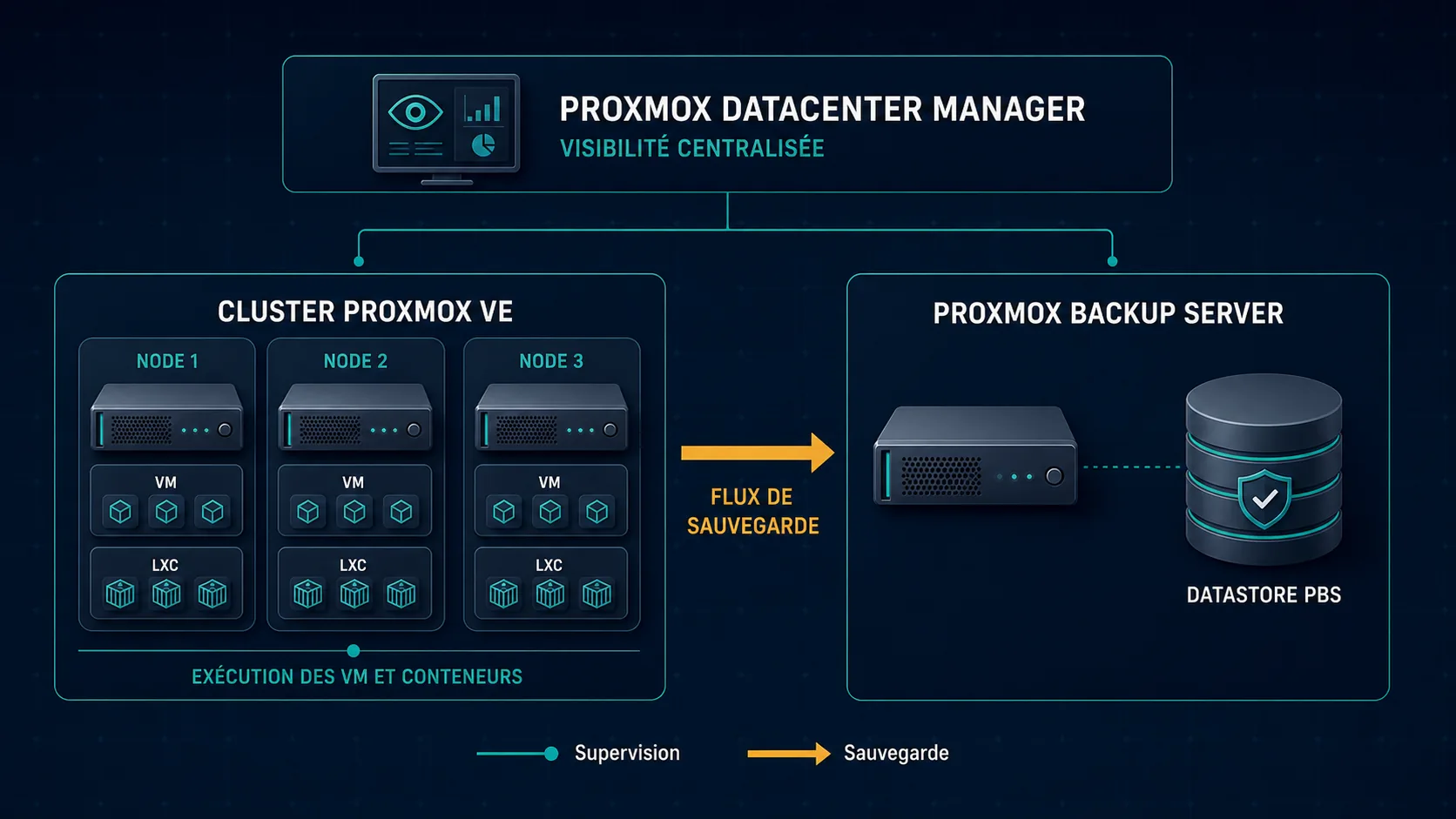
This makes the complete chain easier to understand: the workload, the cluster executing it and the PBS datastore protecting its data.
PDM does not yet replace all PBS functionality. Advanced job, namespace, synchronization and retention configuration may still require the native interface.
Cross-cluster migration
Cross-cluster migration is one of PDM's most strategic capabilities. Source and destination may belong to independent remotes.
This can support hardware renewal, capacity balancing, maintenance, gradual evacuation of an old platform or movement toward a disaster-recovery site.
It is not automatic migration without preparation. PDM needs explicit mappings for source and target storage, network bridges, IDs and available capabilities.
The CLI exposes parameters such as --map-storage, --map-bridge, --migration-network and local-disk transfer. Migration traffic is encrypted by default and should only be made insecure on a genuinely trusted private network.
CPU compatibility
A live-migrated VM must continue executing on the destination processor. CPU models exposed to the guest must be compatible. Different generations or vendors may require a generic CPU model or an offline migration.
Network mapping
A bridge called vmbr100 at the source may not exist at the destination. Matching names does not prove that VLANs, MTU, gateways, filtering and routes are equivalent.
Storage mapping
A source pool such as ceph-prod may map to another Ceph pool or a different backend. Capacity, formats, performance, replication, backup policy and migration bandwidth all need validation.
External dependencies
A VM may depend on addresses, firewall policies, DNS, VLANs, licensing or external storage specific to its original site. PDM transfers the workload; it cannot infer every business dependency.
SDN and EVPN across clusters
PDM integrates with Proxmox SDN and EVPN overlays. It aggregates SDN-zone status and can manage zones or VNets across remotes.
The objective is consistent connectivity when workloads move between clusters. The integration assumes that controllers sharing an ASN really belong to an interconnected overlay.
This remains a network engineering project. BGP, EVPN, VXLAN, ASN, VNI, Route Targets, underlay routing, MTU and redundancy still need to be designed correctly. PDM simplifies management; it does not remove the complexity of a multi-site fabric.
Ceph visibility without merging storage
Version 1.1 provides broader visibility into monitors, managers, OSDs, pools, CephFS, alerts and overall health.
PDM does not combine several Ceph clusters into one distributed storage system. Each remains independent. The value lies in operations, incident detection and capacity planning.
Central update management
PDM consolidates repository status, pending packages and available updates. With compatible PVE and PBS releases, remote shell access can also trigger operations from the central plane.
Centralization does not replace maintenance discipline: validate cluster health, backups and release notes; process one node at a time; then verify quorum, Ceph and workloads before continuing.
Automated installations and subscriptions
PDM 1.1 manages answer files for automated Proxmox installation. Parameters are prepared centrally and fetched by compatible installation media through a token-protected workflow.
This standardizes networking, storage, naming, accounts and installation settings. A central subscription registry can also allocate keys to remotes instead of managing coverage node by node.
Authentication and security
Centralized administration increases the impact of a compromised identity. PDM supports PAM, local PDM accounts, LDAP, Active Directory and OpenID Connect.
TOTP, WebAuthn and recovery keys are available as second factors. API integrations can use revocable tokens rather than user passwords.
Authorization combines users or groups, roles, resource paths and inheritance. Operators can receive rights to a remote, a resource family or an individual VM.
PDM rights do not replace permissions on the remote. The identity used against Proxmox VE or PBS must also be authorized there.
Minimum production controls
- dedicated DNS name and trusted TLS certificate;
- Active Directory or OpenID Connect integration;
- mandatory MFA;
- no shared accounts or routine
root@pamuse; - least-privilege tokens;
- separate audit, operations and administration duties;
- port 8443 restricted to an administration network or VPN;
- monitored sessions and tasks;
- protected PDM configuration backups;
- documented direct access to PVE and PBS.
Installing PDM
PDM can be installed from the official ISO or on a compatible Debian system. The ISO is the recommended method.
For production, Proxmox recommends at least two modern CPU cores, 4 GiB RAM, 40 GB storage, redundant system storage and redundant network interfaces.
The interface listens on HTTPS port 8443:
https://pdm.example.com:8443
PDM can run in a VM, but circular dependencies require thought. Hosting it on a cluster it manages means a full outage of that cluster also removes the central interface, even though other remotes keep running.
Does PDM replace VMware vCenter?
Not completely, and a direct comparison can be misleading.
vCenter is the control center for tightly integrated vSphere environments. PDM oversees several autonomous Proxmox domains.
| Capability | Proxmox Datacenter Manager | VMware vCenter |
|---|---|---|
| Central inventory | Yes | Yes |
| Multiple clusters | Yes | Yes |
| VM operations | Yes | Yes |
| Cross-cluster migration | Yes, with preparation | Depends on architecture and licensing |
| PBS management | Yes | No |
| Native Ceph visibility | Yes | No |
| Multi-cluster SDN | Evolving EVPN support | NSX depending on design |
| Complete central configuration | Still partial | More mature |
| Open-source code | Yes, AGPLv3 | No |
PDM is becoming the central management layer many Proxmox environments were missing. Presenting it as an exact functional replacement for vCenter would nevertheless be premature.
Current limitations
The official roadmap still lists hierarchical folders, finer delegation, more detailed roles, bulk guest operations, global backup-job visibility and broader guest configuration.
PDM roles are currently predefined; fully custom roles cannot yet be created.
Recommended deployment architecture
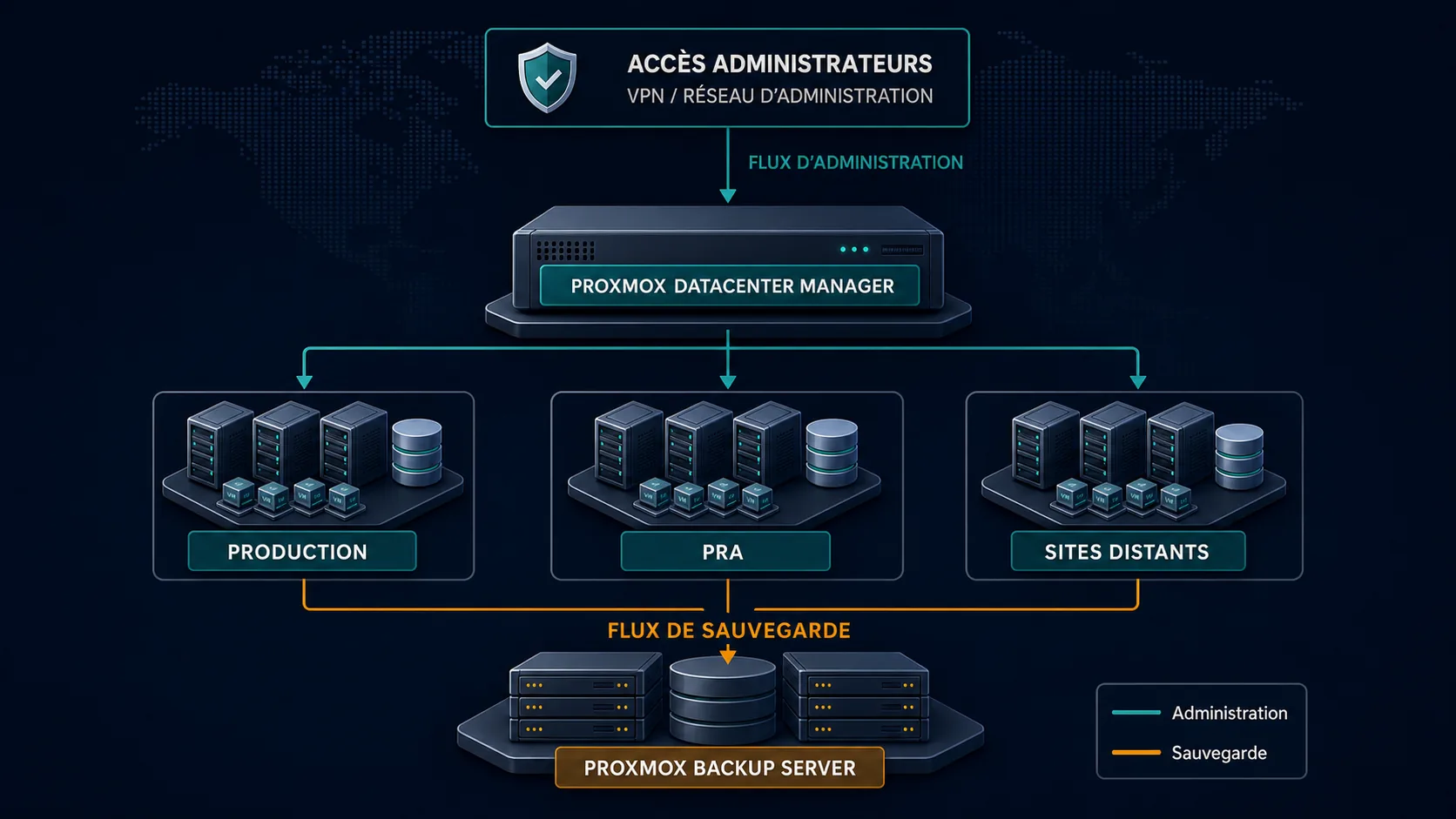
The essential principles are separate administration flows, reliable DNS and NTP, trusted TLS, MFA, dedicated service identities, least privilege, external monitoring, configuration backup and documented direct access to every remote.
Should you deploy PDM now?
PDM provides immediate value for organizations running multiple clusters, several sites, multiple PBS servers, shared operations teams, regular workload moves or centralized update policies.
For one small cluster, the native Proxmox VE interface already covers local administration and PDM adds another component to maintain.
The useful question is therefore: does the current cost of fragmented interfaces, inventories and procedures justify a central control plane? When the answer is yes, PDM deserves a pilot.
A seven-step pilot
- Install PDM on a dedicated platform.
- Configure DNS, TLS, NTP, MFA and backup.
- Connect a test cluster with a restricted account.
- Validate inventory, metrics and tasks.
- Register a PBS instance.
- Test cross-cluster migration with a non-critical VM.
- Document degraded operations without PDM.
Acceptance criteria should cover inventory quality, rights delegation, traceability, network mapping, local-disk migration, rollback and PDM recovery.
Point of view
Proxmox Datacenter Manager is a structural step in the maturity of the Proxmox ecosystem.
Its strength is not turning every cluster into one monolithic infrastructure. It preserves cluster autonomy while adding global inventory, common monitoring, centralized operations, cross-cluster migration and visibility into PBS and Ceph.
PDM should be seen as more than a dashboard, but not yet described as a perfect vCenter equivalent.
Most importantly, it shows that Proxmox is moving beyond isolated cluster management toward distributed, multi-site enterprise infrastructure. For organizations planning an exit from VMware, that evolution may be as important as the hypervisor itself.